Building the strip
Build the 9-LED chain first, as a standalone piece. You'll connect it to the Scion and USB power later.
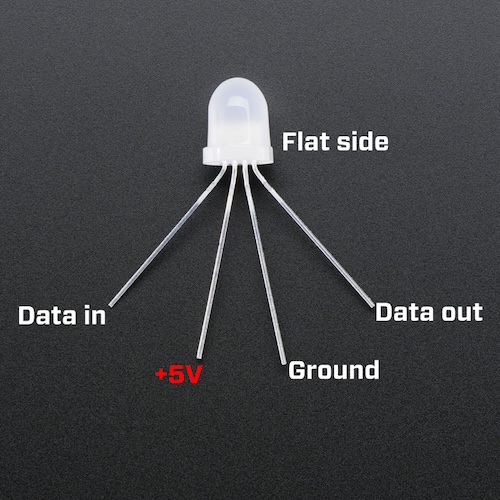
How a NeoPixel is pinned out
- DIN — data in (from the previous LED or the Scion for LED #1)
- V+ — +5V rail
- GND — ground rail
- DOUT — data out (to the next LED's DIN)
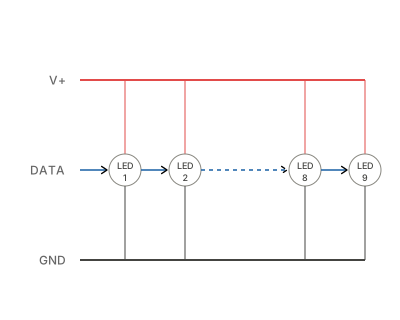
How the 9 LEDs connect
- Power and ground are parallel: every LED's V+ connects to one shared rail, every GND to another.
- Data is serial: each LED's DOUT wires to the next LED's DIN. LED #1 receives from the Scion. LED #9's DOUT is unused.
LED #1 is reserved for the UI
LED #1 does not react to bioelectric input. The Pocket Scion firmware uses it as a user interface indicator, for example to show the current volume or sensitivity level. Only LEDs #2 through #9 light up in response to bioelectricity.
Prep your wire
Cut 22 AWG segments, strip ~3mm off each end:
- 8 pieces for V+ between LEDs
- 8 pieces for GND between LEDs
- 8 pieces for data between LEDs
- 3 pieces for the "entry" wires (V+, GND, DATA) that will reach back to the Scion and USB cable
Length and color are up to you, whatever suits your layout.
Solder the chain
For each LED from #1 to #9:
- Solder a V+ wire from the previous LED's V+ to this LED's V+
- Solder a GND wire from the previous LED's GND to this LED's GND
- Solder a data wire from the previous LED's DOUT to this LED's DIN
LED #1 is the start: leave its V+, GND, and DIN legs bare for now, you'll attach the long entry wires to them at the end.
After soldering each LED, check your work: no solder bridges, no swapped V+/GND, no DOUT-to-DOUT mistakes. DIN and DOUT are easy to confuse, so keep the pinout photo nearby.
Once the chain is complete, solder the three entry wires to LED #1's V+, GND, and DIN legs.
Label your wires
If you're using a single wire color, tape labels on each one so you can tell V+, GND, and DATA apart.
Tape off LED #9's DOUT
LED #9 is the end of the chain. Its DOUT leg is unused. Bend it away from the other legs and cover it with tape or a piece of heat shrink, so it can't touch anything.
Sanity test the strip
Before connecting to the Scion, use a multimeter in continuity mode to check your soldering:
- V+ rail: probe LED #1 V+ leg to LED #9 V+ leg. Should beep.
- GND rail: probe LED #1 GND leg to LED #9 GND leg. Should beep.
- No short: probe any V+ leg to its neighbor GND leg on the same LED. Should NOT beep.
If the V+ or GND rail doesn't beep, you have a broken joint somewhere along that rail. If the short test beeps, you have solder bridging V+ and GND. Find and fix before moving on.